Expense submission through mobile app

Payroll claim submission through mobile app

You can submit Payroll claims through your mobile app. To do so follow the steps listed below. Refer to the articles on Claiming Salary Reimbursements for more details.

1. Click on (+) on the top right of your screen.


2. You will be asked to select the activity you want to do. Select "Payroll Claims". You will be navigated to Claims home page. Click on "Payroll Claim" button on this page.

3. Fill up the Claim form. The form has two parts

Part 1 - Claim Summary


Fill up the Details / Remarks on the summary page 

Part 2 - Claim Details

Tap on the "Add Details" button to add line item wise details of the claim. On tap a new page will open in which you can provide the details of expense as shown below.
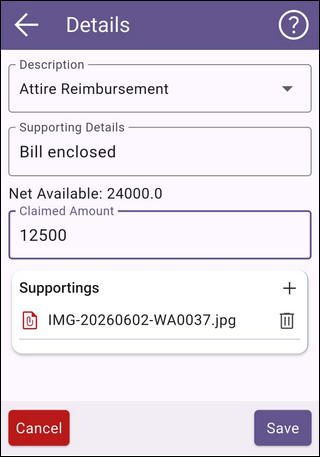
You can upload supporting from your mobile directory or by clicking a photo using the mobile camera. The added line items can be modified / deleted till you have not submitted the form.

Once all details completed, you can submit the form or if you want to save as draft your request then click button "Save as Draft".


    • Related Articles

    • Payroll Claims on mobile app

      Payroll claims / reimbursements can be submitted from mobile app. 1. On the HRMS page tap on the "Payroll" section as shown below 2. You will be navigated to Payroll page from where you can access the Claims card as shown below. Tap on it. 1. Claims ...
    • Hiring through mobile app

      If you have the authority you can initiate the hiring of an employee through the mobile app. To do so please follow the steps given below. 1. Click on the + icon on the top right of your screen 2. You will be asked to select the activity you want to ...
    • Work Area - Activities page on mobile app

      You can review and complete all your pending activities available on mobile app from this page. 1. Tap on the Work Area icon on the bottom menu 2. Tap on the Activities tab - you will be navigated to the Activities page as shown below. 3. Activities ...
    • Submitting asset request through mobile app

      You can request an asset through your mobile app. Refer to the article on Asset Management Overview for more details. To create an asset request follow the steps listed below. 1. Click on the + icon on the top right of your screen 2. You will be ...
    • Accessing reports on mobile app

      Employees can access some reports through the mobile application. These reports are available in HRMS and Payroll sections. 1. HRMS > Reports Tap on reports card on HRMS tab as shown below You can download the documents issued to you and also access ...